如何製作Notion 年、月、日進度列條? 快速掌控自己的人生進度!

如果你跟我一樣,常常不知道現在過到幾號,或是今天是星期幾 (這絕對不是健忘! 而是因為我們把注意力用在其他更重要的事情上 ?),那便很需要一個進度列條,提醒我們目前還剩多少時間。
若將此進度列條與自己的目標進度做比對,便可快速地知道,我們現在是需要更努力地追進度,還是已經達標,可以悠哉地放個小假!
今天,想跟大家分享,我如何用Notion公式寫出年、月、日的進度列條,快速掌控自己剩餘的時間與進度!
你會學到: (可快速點選連結)
一、Notion公式: 「年」進度列條 二、Notion公式: 「月」進度列條 三、Notion公式: 「週」進度列條 四、Notion公式: 「日」進度列條 五、Notion外掛小工具: 不用任何公式,就可以快速做出人生進度列條!此篇是Notion進度列條公式的進階應用,若你還沒有基本的公式概念的話,建議可以先參考此篇文章: 如何製作NOTION進度列條? 3種風格任你挑!

一、Notion公式: 「年」進度列條
公式:
if(year(now()) % 4 == 0, slice("▓▓▓▓▓▓▓▓▓▓", 0, 10 * toNumber(formatDate(now(), "DDD")) / 366) + slice("░░░░░░░░░░", 10 * toNumber(formatDate(now(), "DDD")) / 366) + " " + format(floor(100 * toNumber(formatDate(now(), "DDD")) / 366)) + "%", slice("▓▓▓▓▓▓▓▓▓▓", 0, 10 * toNumber(formatDate(now(), "DDD")) / 365) + slice("░░░░░░░░░░", 10 * toNumber(formatDate(now(), "DDD")) / 365) + " " + format(floor(100 * toNumber(formatDate(now(), "DDD")) / 365)) + "%")公式基本概念說明
- 每月進度 = 今天為今年的第幾天 / 今年的總天數
- 一年的總天數共有2種可能
- 若為閏年,則一年共有366天
- 若非閏年,則一年共有365天
公式解析
1. 判斷今天是否為閏年, 若為閏年,一年天數以366天計算,若不為閏年,則一年天數以365天計算
if(year(now()) % 4 == 0
2. 在閏年的情況下,計算今天為今年的第幾天,並換算成年度百分比
slice("▓▓▓▓▓▓▓▓▓▓", 0, 10 * toNumber(formatDate(now(), "DDD")) / 366) + slice("░░░░░░░░░░", 10 * toNumber(formatDate(now(), "DDD")) / 366) + " " + format(floor(100 * toNumber(formatDate(now(), "DDD")) / 366))? slice("▓▓▓▓▓▓▓▓▓▓", 0, 10 * toNumber(formatDate(now(), "DDD")) / 366)
- 意義: 每10%就取一格
- toNumber(formatDate(now(), "DDD"): 計算今日為今年的第幾天,並轉呈數字格式
? slice("░░░░░░░░░░", 10 * toNumber(formatDate(now(), "DDD")) / 366)
- 總進度列條共有10格,用 ░ 來補足 ▓ 後面不足10的格數
? " " +format(floor(100 * toNumber(formatDate(now(), "DDD")) / 366)) + "%"
- " " +: 在進度條 與 百分比數字間,加上一個空白
- floor ( ): 無條件捨去 進度百分比
- format(floor)+ "%": 將上一步算完的進度百分比轉成文字,並在後方加上”%”。
3. 在今年非閏年的情況下,計算今天為今年的第幾天,並換算成百分比 。計算邏輯同閏年情境(公式解析2),僅差在總天數: 閏年為366天,非閏年為365天
slice("▓▓▓▓▓▓▓▓▓▓", 0, 10 * toNumber(formatDate(now(), "DDD")) / 365) +
slice("░░░░░░░░░░", 10 * toNumber(formatDate(now(), "DDD")) / 365) +
" " + format(floor(100 * toNumber(formatDate(now(), "DDD")) / 365)) + "%")
二、Notion公式: 「月」進度列條
公式:
if(year(now()) % 4 == 0 and month(now()) == 1, slice("▓▓▓▓▓▓▓▓▓▓", 0, 10 * toNumber(formatDate(now(), "D")) / 29) + slice("░░░░░░░░░░", 10 * toNumber(formatDate(now(), "D")) / 29) + " " + format(floor(100 * toNumber(formatDate(now(), "D")) / 29)) + "%", if(month(now()) == 1, slice("▓▓▓▓▓▓▓▓▓▓", 0, 10 * toNumber(formatDate(now(), "D")) / 28) + slice("░░░░░░░░░░", 10 * toNumber(formatDate(now(), "D")) / 28) + " " + format(floor(100 * toNumber(formatDate(now(), "D")) / 28)) + "%", if(month(now()) == 0 or month(now()) == 2 or month(now()) == 4 or month(now()) == 6 or month(now()) == 7 or month(now()) == 9 or month(now()) == 11, slice("▓▓▓▓▓▓▓▓▓▓", 0, 10 * toNumber(formatDate(now(), "D")) / 31) + slice("░░░░░░░░░░", 10 * toNumber(formatDate(now(), "D")) / 31) + " " + format(floor(100 * toNumber(formatDate(now(), "D")) / 31)) + "%", if(month(now()) == 3 or month(now()) == 5 or month(now()) == 8 or month(now()) == 10, slice("▓▓▓▓▓▓▓▓▓▓", 0, 10 * toNumber(formatDate(now(), "D")) / 30) + slice("░░░░░░░░░░", 10 * toNumber(formatDate(now(), "D")) / 30) + " " + format(floor(100 * toNumber(formatDate(now(), "D")) / 30)) + "%", ""))))公式基本概念說明
- 每月進度 = 今天日期 / 該月總天數
- 每個月份的總天數不同,因此在公式中會分成4大類型來計算
- 閏年 & 2月: 29天
- 非閏年 & 2月: 28天
- 大月: 31天
- 小月: 30天
公式解析
1. 若今年為閏年,且現在為2月,則在計算月進度時,該月總天數以29天為分母來計算
if(year(now()) % 4 == 0 and month(now()) == 1
- 今年為閏年,且現在為2月
- month( ) = 0,為1月;month( ) = 1,為2月....依此列推;month( ) = 11,為12月
? 計算今天為該月的第幾天,並換算成百分比 。
slice("▓▓▓▓▓▓▓▓▓", 0, 10 * toNumber(formatDate(now(), "D")) / 29) + slice("░░░░░░░░░░", 10 * toNumber(formatDate(now(), "D")) / 29) + " " + format(floor(100 * toNumber(formatDate(now(), "D")) / 29)) + "%"2. 若今年為非閏年,且現在為2月,則在計算月進度時,該月總天數以28天為分母來計算
if(month(now()) == 1,
slice("▓▓▓▓▓▓▓▓▓▓", 0, 10 * toNumber(formatDate(now(), "D")) / 28) +
slice("░░░░░░░░░░", 10 * toNumber(formatDate(now(), "D")) / 28) +
" " + format(floor(100 * toNumber(formatDate(now(), "D")) / 28)) + "%"
3. 若現在為1, 3, 5, 7, 8, 10, 12月,則在計算月進度時,該月總天數以31天為分母來計算
if(month(now()) == 0 or month(now()) == 2 or month(now()) == 4 or month(now()) == 6 or month(now()) == 7 or month(now()) == 9 or month(now()) == 11,
slice("▓▓▓▓▓▓▓▓▓▓", 0, 10 * toNumber(formatDate(now(), "D")) / 31) +
slice("░░░░░░░░░░", 10 * toNumber(formatDate(now(), "D")) / 31) +
" " + format(floor(100 * toNumber(formatDate(now(), "D")) / 31)) + "%"
4. 若現在為4, 6, 9, 11月,則在計算月進度時,該月總天數以30天為分母來計算
if(month(now()) == 3 or month(now()) == 5 or month(now()) == 8 or month(now()) == 10,
slice("▓▓▓▓▓▓▓▓▓▓", 0, 10 * toNumber(formatDate(now(), "D")) / 30) +
slice("░░░░░░░░░░", 10 * toNumber(formatDate(now(), "D")) / 30) +
" " + format(floor(100 * toNumber(formatDate(now(), "D")) / 30)) + "%"
三、Notion公式: 「週」進度列條
1. 以星期日為該週的最後一天
if(day(now()) == 0, "▓▓▓▓▓▓▓▓▓▓ 100% ", slice("▓▓▓▓▓▓▓▓▓▓", 0, 10 * day(now()) / 7) + slice("░░░░░░░░░░", 10 * day(now()) / 7) + " " + format(floor(100 * day(now()) / 7)) + "%")2. 以星期日為該週的第一天
if(day(now()) == 0, "▓░░░░░░░░░ 14% ", slice("▓▓▓▓▓▓▓▓▓▓", 0, 10 * (day(now())+1) / 7) + slice("░░░░░░░░░░", 10 * (day(now())+1) / 7) + " " + format(floor(100 * (day(now())+1) / 7)) + "%")? 此範例圖是以「星期日」當作週的「第一天」: 2021/4/18 (日)
四、Notion公式: 「日」進度列條,以小時計算
公式:
slice("▓▓▓▓▓▓▓▓▓▓", 0, 10 * hour(now()) / 24) + slice("░░░░░░░░░░", 10 * hour(now()) / 24) + " " + format(floor(100 * hour(now()) / 24)) + "%"五、Notion外掛小工具: 不用任何公式,就可以快速做出人生進度列條!
如果你能一路看到這裡還沒頭昏,真的很厲害!
偷偷跟你說,有個好用的Notion外掛小工具網站: https://indify.co/,不用寫公式,只要2步驟,就能輕鬆製作出Notion 年、月、日的進度列條!
步驟一: 進到 https://indify.co/,註冊登入後,選擇Life progress bar 小工具

步驟二、於左側編輯欄選擇想要呈現的內容,並複製最下方的連結貼到Notion頁面上,就大功告成囉!
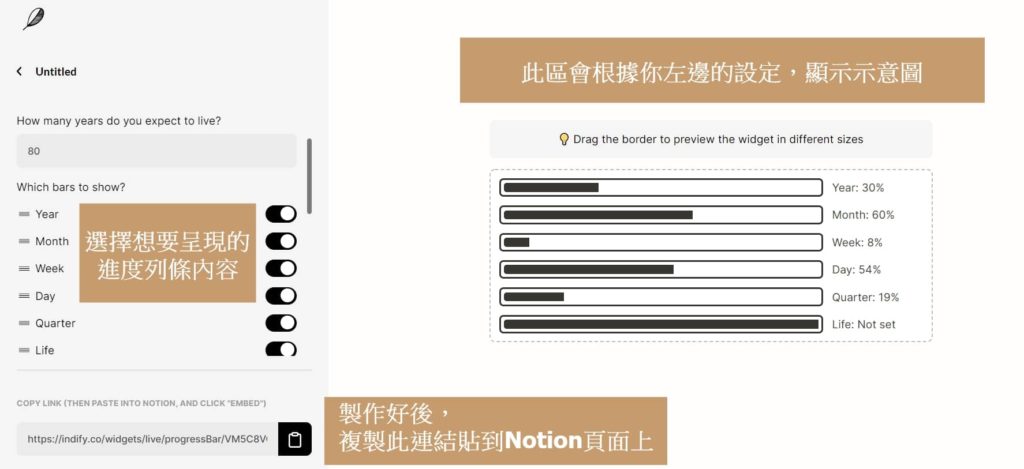
在工作上,我喜歡用「月進度列條」來對比該月業績目標的達成率,知道何時該努力,何時可以放鬆。
而在人生夢想的追尋上,我喜歡用「年進度列條」來提醒自己,今年還剩多少時間,可以做有意義的事情,維持有意義的關係!
現在,就一起動動手,來試試看吧!
《重要資源連結》
- ? Notion模板連結:Notion 年、月、週、日 進度列條
- ? 限時免費Bonus:『高效工作、優雅生活』牧羊妮Notion模板大全

AI 顧問、《Notion 人生管理術》作者。共同創辦迪卡儂電商,協助 adidas、Lenovo、台新銀行等一線品牌導入 AI。相信讓 AI 扛下繁瑣,把最好的時間留給重要的人和事。
更多關於牧羊妮 →